Thursday, June 21, 2007

webcam infra red night vision


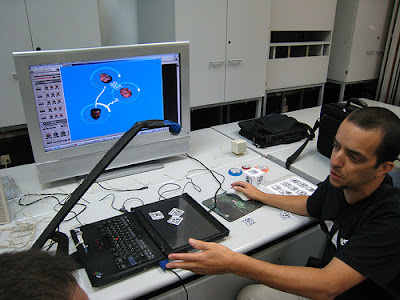
TangibLaptop should work in light and dark environments and also has the screen which lights under the objects.
To make the life of the camera and image processing easier, we will move them to the InfraRed (IR) spectrum.
How? in 2 steps:
1. Remove the "infrared blocker" from your CCD webcam.
2. Create a IR Leds lamp next to the the camera.

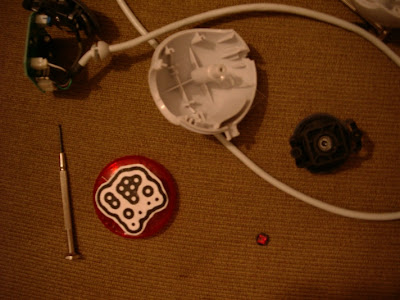
I have just turn my webcam into an infra-red cam for the TangibLaptop,
and almost got myself injured in one eye.
I scratched the "infrared blocker" (a reddish small glass) to remove it, and small pieces of
glass got into my eye.

I got 3 words for you:
wear protection goggles

http://www.hoagieshouse.com/IR/
http://www.instructables.com/id/ERMMQSO60AETOMKIEX/
http://www.instructables.com/id/EF7RFPCE2YEP287GZV/


Coming up next... DYI Infra-Red Leds lamp.

Labels:

Saturday, June 16, 2007

Person created a Reaktor project


it sound ugly.... (because we used sine waves,)
but,,, behind the scenes, it is beautiful.
this is a major break through, images, waves connections, and now, Reaktor automation.
now, its time for some fine tuning to make it look and sound good.


Labels:

Friday, June 15, 2007

Render waves as connections

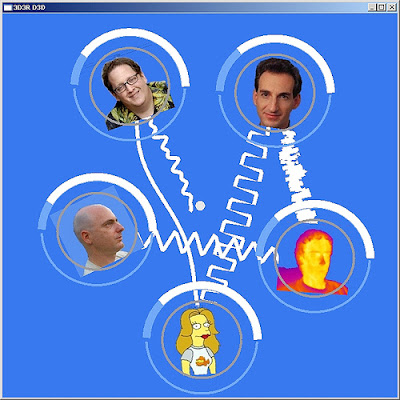
Ohad 3D3R Pressman, just added the option to render connections as waves.
I have added few waves and GarageGeeks head images.

Labels:

Tuesday, May 29, 2007

Controlling ReBirth TB303

Labels:

Friday, May 18, 2007

Integration 4 - Graphics included


guys,
you wouldn't believe that, but leaving my house today at 18:30 to get some Chinese take away, I see Person, calling me.
that was freeking weird. he came to visit his sister, one building next to my house.
so, he will work on preparing a "Reactor" project which I will use, and I will send him an xml that defines it. the project will have about 4 objects (oscillator, LFO,etc;) that are being controlled by midi Chanel and a controller.
Right now the xml only defines objects, and how their controller values are being changed.
We will not handle connections, right now. let's stabilize the whole midi thing without the connections between objects, and in few days we will go for connections. I have attached one xml as an example.
Person using the TUIO simulator and a TUIO client console (gg_reactable_console.exe) which sends MIDI to Reactor.
Ohad using the TUIO simulator and the TUIO graphic client (gg_reactable_viz.exe) which sends MIDI to dev-null :).
Rafi - using the TUIO server and the TUIO graphic client which sends MIDI to Reactor.

Labels:

Thursday, May 17, 2007

first milestone tasks


image: Ohad first visualization


hey guys,
I want us to hit the first milestone - integrating all parts together
touch, see and hear it works.

the components:
rafael : server and integration: camera + image processing -> send TUIO
on UDP port 3333
ohad: graphics: listen on TUIO on UDP port 3333 + visualisation -> send midi
person/elad: sound: listen to midi + modular environment
tal: physics: create the objects from perspex + plastic transparent
cover of the screen.

* Ohad, The graphic part handle this visualisation and also
send to midi, The graphic part gets an XML file which defines the objects and the
MIDI that they will send.

Person/Elad:
I will read Person MIDI document and will implement it into the MIDI xml config file.
We will extend this and add information into this XML file which will
describe the relations between objects.
Ohad will use this xml as an input to the graphics client.
Person will use this xml as an input to the dummy client that sends midi.

Tal:
attached is the version of images that I currently use.
we will start by using objects 0 to 4
* prepare only 5 objects with max size of 5cmX5cm
3 round circle shaped objects
1 square shaped object
1 square 3D cube shaped object (we will use it as multi-purpose
object, which can have 6 objects types)
* plastic transparent cover of the screen, so the objects will not scratch it.

Labels:

Sunday, May 13, 2007

TUIO client is sending midi


Midi guys,
I have dissected the midi feature from the TUIO Server, and placed it
into a TUIO client.
attach you may find:
* a TUIO table simulator (TUIO_Simulator-1.3.zip - java application)
* a TUIO client that prints out the TUIO information,
and also send it to MIDI device.

start the TUIO table simulator, and then, start the TUIO client.
sample TUIO client command: tuiodump.exe 3333 1 midi/demo.xml
Note, the demo.xml file defines objects 0-11, so if you wanna see MIDI
information, use objects 0-11 at the table simulator.

Labels:

Render waves

I just had this brilliant idea (sorry for being modest ;) which I
think can boost our visualizations creation process.
I am talking about the connection between the objects,
Instead of being creative and creating a special sine graph or
something like that, for each object.

we can create a general wave plot function which pre-loads a wave
file, and print it between 2 points. function will also support
stretch and amplitude.
this way we can load all kind of waves into each object.

there will be 16 object types.(defined by those wierd pictures)
Actually the table should support throwing several objects from the
same type, that will have different object ID.
Person will "attach" every object ID to a special
sound/wave/controller/oscilator/whatever.
and at the graphic part we will choose some wave that looks similar to
the music part.

Labels:

Thursday, May 10, 2007

camera is mounted


well, the camera is mounted.

next, I am doing some lights and sizes tests.

Labels:

Wednesday, May 9, 2007

first integration video

check out the first integration video:
http://www.youtube.com/watch?v=lVaE914pOb0

Labels:

Had a talk with Person

Had a talk with Person,
he will be in charge of the midi/music part.
he will setup an environment that can receive midi information and use
it for controllers, and also for automation of a modular.
This can be achived by Cubase hosting a Reaktor, but Person can choose
whatever setup he wants. he is our boss in this area.

terminology:
Object - the tangible physical things that you put on the table.
Object Type - What does this object does? A loop, a sample, oscilator,etc'
There can be about 60 object kinds, but we will start by creating up
to 16, and see how it goes. You can place several objetcs from the
same kind.
We will also create multi-types-objects, objects which looks like a
cube, that have different kind of type on each side of the cube.
Value - Objects can have a value which defined by the angle they are rotated.
This value can be used for velocity, tempo, value of a midi controller, etc'
Attach - An object can attach himself to other objects and affect (or
shell I say effect :) on them.

Labels: